Sunday, February 3, 2013

Taking my Radical Tech Agenda to the Air

At 10AM on Saturday, February 9th,  the Union of Benevolent Electrical Workers (UBEW will be co-hosting GeekSpeak, the local weekly tech radio show and podcast. We will be discussing our "radical tech agenda" amongst other things.

If you're unfamiliar with GeekSpeak, you should check them out. I listen to them most every week -- strangely, they come on the radio about the same time I'm usually starting my weekend soldering projects. So for me, it's great... I have a soldering iron in hand, listening to people on the radio talk about geeky subjects. If you're a pod-casting type, you can subscribe to their feed via the NPR Podcast Directory.

The Union of Benevolent Electrical Workers (aka UBEW) is a "radical collective of individuals doing socially beneficial things with technology who come together for mutual assistance." We're like a Dadaist users' group focused on things that help the local community. For instance, UBEW and the Santa Cruz Free Skool offer classes in tech-related subjects ranging from PHP & Java programming and cryptography to basic soldering.

There's also an outside chance we'll talk about the etymology of the term "Code Mollusk."

If you're in the Monterey Bay area, you can listen in on 88.5 KUSP or repeaters at 89.1 (Hollister/Gilroy), 89.3 (Downtown Santa Cruz), 91.3 (Palo Colorado Canyon) and 95.3 (Big Sur Valley.)

If you live somewhere else, you can listen on the web using the KUSP web player at http://www.kusp.org/listen-live.html .

Feel free to call in during the show and toss questions our way. 831.476.2800 or 800.655.5877
In short, we like to think we're doing good things for our community and we're going to be on KUSP 88.9 at 10AM next Saturday (February 9th, 2013).

Monday, January 28, 2013

A Tale of Six Keyboards

Your keyboard sucks. It's okay, mine sucks too.

I'm not saying they're unusable, but I've been thinking about some of the UI work I did in the 80's and 90's and realized that computer keyboard design has converged on a usable, but still mildly sucktastic norm. I'm going to talk about the standard US 104 key keyboard, but standard keyboards from other countries suck in very similar ways.

PLATO Terminal Keyboard
Keyboard 1 : PLATO Terminal
So look at this keyboard; it's from a PLATO Computer System terminal from the 1970's. If you look closely, you'll see a few keys that might seem strange to modern sensibilities. I'm quite partial to the EDIT, COPY and ERASE keys. Think about the number of times you hit Control-C each day. In the 1970s we had our own key for common operations, we weren't technologically devolved cretins content to swallow the UX pablum from Cupertino and Redmond!

So you might be wondering why i'm so excited about a fixed-function key. Why not just reprogram one of the function keys on the top of most keyboards and be done with it? I could probably make well-reasoned arguments why certain functions should have their own keys. But it really boils down to the fact that in the thirty-five years I've been messing with computers, I've never once used the CAPS LOCK, SCROLL or PAUSE key and have nearly worn out the ligaments in one of my fingers pressing control and S at the same time (not to mention Control-C, Control-V, Control-Z, etc.) The big problem I have with the modern keyboard is that I think it could be better. PAGE UP and PAGE DOWN are universal on keyboards (well... at least on keyboards that don't have fruit on them.) It's time to give COPY, PASTE, CUT, UNDO, OPEN and SAVE their due.

Atari 800 Keyboard
Keyboard 2 : The Atari 800
So let's skip forward a few years and look at another keyboard. This one's from the Atari 800. If you look on the right side of the keyboard there are keys marked SYSTEM RESET, OPTION, SELECT and START. The user typically used the OPTION and SELECT keys at system start-up to navigate a menu of options and pressed the START key when all the options were correct. This being the 1980's the SYSTEM RESET key was used to rescue the user when the system was unduly horked.

So what do we have so far? The PLATO terminal had function-specific keys for things you did mostly AFTER you logged in and the Atari 800 had keys whose canonical use was to select options prior to launching software. Imagine how many fewer times your mother would call you if, after her PC booted up, PC BIOSes displayed a menu on the screen and lit up LEDs under the few keys that navigated you through the following options:

  • START WINDOZE,
  • BOOT OFF A THUMB DRIVE (DID YOU KNOW YOU COULD DO THAT?) and
  • DO SOMETHING REALLY COMPLICATED THAT YOU SHOULDN'T EVEN THINK ABOUT DOING UNLESS YOU'RE UNDER 19 YEARS OLD OR HAVE BEEN TO COLLEGE.
TRS-80 Model 100
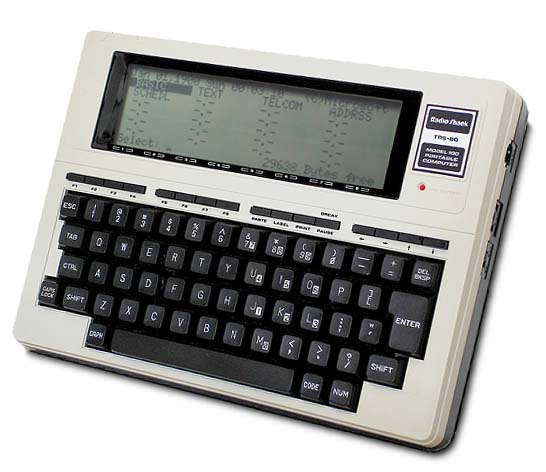
Keyboard 3 : TRS-80 Model 100
Now here's my favorite keyboard. Believe it or not, I still have one of these things. They last for about three weeks on four AA batteries and take about four seconds to boot up. The TRS-80 Model 100 keyboard is almost a counter example. If you look closely at the keyboard, you can see that it has eight function keys. And you might be thinking to yourself, "Hey! I though you hated function keys!?" And you would be right. I mostly do. This keyboard is the exception to the rule; and here's why. On the Model 100's keyboard is a key marked LABEL. If you press it, the specific function of each of the function keys is displayed on the bottom row of the screen. Some DOS software from the old days used to do this on IBM PCs as well. But all of the built-in software on the Model-100 did it, and that's the cool part.

One thing I would LOVE to see (and may try to hack into various open source browsers) is to have the functions of each of the function keys be displayed if you press the SCROLL key. It's not like anyone is actually using the SCROLL LOCK key.

Keyboard 4 : The Epson QX-10 (VALDOCS)
Moving on, check this out! It's the keyboard for the Epson QX-10 VALDOCS and it is MAGNIFICENT! I still have dreams where me and the QX-10 HASCI keyboard are skipping through fields of fresh wild-flowers together. Look at it! It has an individual key for just about every thing you would want to do: copy things, change font sizes, etc. Sure, the Margin Release button on a word processor is probably a little excessive, but that's the way I roll.

This keyboard also had keys that were supposed to launch different applications like a drawing program and a spreadsheet. This function has been re-introduced in some keyboards recently and this makes me happy.

Okay... two more to go, don't give up on me now...

Keyboard 5 : The Macintosh Portable
Behold the majesty that is the Macintosh Portable. Okay, maybe "majesty" isn't the right word. It had crappy battery life and weighed more than my drunk college roommates I had to carry home from time to time. But it did have one very, very cool feature: you could open the keyboard cover and move the trackball to the other side of the keyboard. This was great for left-handed mousers like myself.

In my dream world, all keyboards would be like this, you could open up the cover and (re)move the numeric keypad. Or replace the numeric keypad with a trackpad. Or a touch screen. Or a couple rows of function keys.

The Google ChromeBook
Keyboard 6 : The Google ChromeBook
So sure... it's unlikely we'll see major changes to computer keyboards anytime soon. But I am happy to report one hopeful sign: Google has removed the CAPS LOCK key from their ChromeBook line. It's been replaced by the SEARCH key. Hallelujah!

Thank you for listening to my screed. As you can tell, I'm passionate about the relatively obscure subject of computer keyboards. And to be sure, most modern computer keyboards are just fine. But the next time you start typing, take a moment to consider... they could be better

Thursday, January 24, 2013

The 104 Button Mouse

In the old days, geeks used to amuse themselves with arguments over how many buttons a mouse should have. I think we all know the argument: Doug Engelbart's original mouse had one button, therefore all mice forever and ever should have one. Or... the UX wizards at Apple decided one button was correct, therefore we should never have more than one. ever. Heck, even some early OS/2 and WinTel only had one or two buttons. (Yes, there was a era before all mice had three buttons w/ scroll wheels.)

My argument was always that mice should have zero buttons.

If you look at that thing next to your mouse... the thing with all the keys on it... yeah, the keyboard! those aren't enough buttons for you? In the late 80's / early 90's i put together a mockup of a system that used F2 - F5 as Select, Move, Resize and Delete. So instead of worrying about left- or right- clicks or alt- or control- clicks, you just used the mouse as a pointing device, then used the keyboard to specify the operation you wanted to perform on the thing under the mouse pointer.

Just for giggles, I setup a very basic prototype at http://info.meadhbh.org/mousetest.html . If you're hip to a new experience, just click on over and give it a try. To use it, move your mouse around on the screen, pressing various keys creates, moves, resizes and colorizes boxes:
  • N - creates a New box
  • M - toggles "Move Mode" - hit 'M' again to stop moving the box
  • C - cycles through a few colors
  • R - toggles "Resize Mode" - hit 'R' again to stop resizing the box
Cheers!

Tuesday, January 22, 2013

Mining Big Asteroids : Psyche Direct

In which I talk about another idea for mining metals for asteroids...

So a lot of people know I have an interest in space: I've been a lifelong amateur astronomer, I originally studied optics and planetary science in college and I recently had the privilege of helping Skybox Imaging work out some of the kinks in their flight control system. And if you've spent any time with me recently, you know it's hard to get me to stop talking about some of the recent developments in "New Space" (click on that link if you're unfamiliar with the term, it's worth the few minutes it will take.)

Today we heard about the launch Deep Space Industries, the second of two major companies focused on harvesting ice and metals from asteroids. Sure, it sounds like science fiction, and it probably is in the near term. But in the medium and long term, the only reason it sounds like fiction is simply that no one's done it before.

DSI has an interesting idea: instead of sending astronauts or robot miners to the asteroids, they want to bring small asteroids into High Earth Orbit where human beings can have a much easier way of getting to them. Rather than spend six months travelling to your target, a year there and six months back, you spend a couple years tugging a relatively small 5 or 10 meter asteroid here where it only takes a couple days to get to.

Cool stuff.

Planetary Resources, who announced their plan to mine asteroids last year, has a slightly different (perhaps more obvious) plan: just go to a small asteroid and mine it.

Also very cool.

But as cool as both these companies are, they're both planning on doing a lot of prospecting before they start mining operations. Sure... you have to do some prospecting, but both companies are planning on launching constellations of small satellites to search for appropriate candidates before engaging in extraction operations.

This seems a little wasteful to me. Given the time value of money, the sooner you can turn a profit, the better. So why spend several years looking for small asteroids when asteroid 16 Psyche seems to be a large chunk of nickel-iron floating out in space?

If your plan was to scrape metal off 16 Psyche and bring it back to Earth orbit, you would still need to develop the technology for mining in space. And it's unlikely you could make a mining robot without sending at least one prospector craft to get a good look at your mining site. But, instead of spending time looking for a candidate, you would be developing deep space mine-bots.

I call this plan "Psyche Direct" (apologies to Robert Zubrin.)

  1. Develop the prospector craft.
  2. Send the prospector craft to 16 Psyche.
  3. Begin developing mine-bots (bus, power, return craft, etc.)
  4. Analyze results from prospector, use them to refine the mine-bots.
  5. Send the mine-bot to 16 Psyche.
  6. Return to Earth orbit with metals.
  7. Profit!
I just wanted to get this idea out there and see if anyone has comments... More to come!

Saturday, November 24, 2012

Randolph the Red-Head Sea Lion

This one goes out to all the beach bums and surfers out there...

You know Swimmer and Diver and Shelly and Cowling...
Comet and Pooper and Beachbum and Barker...
But do you recall,
the most famous sea lion of all..
Randolph the red-head sea-lion,
had a very itchy ear.
And if you ever saw it,
you would even say "oh dear!"
All of the other sea lions,
used to laugh and call him names.
When he was tagged by a marine-biologist,
they gave him all the blame.
Then one foggy Christmas Eve,
Santa came to say:
"Randolph with your GPS tracker so bright,
won't you pull my board tonight."
Then all the sea lions loved him;
as they shouted out in horror,
"Oh, for the love of christ!
Santa's wearing that damn speedo again!"

Apologies to Johnny Marks, wherever you are...


Sunday, August 5, 2012

Call your senators; tell them to support S. 3211

I'm writing this a few hours before we find out whether Mars Science Laboratory / Curiosity survives the plunge into the martian atmosphere. If you're like me, every time we send a craft into space, you get a lump in your throat and a tear in your eye. We're using science, technology and the adventurer's spirit to extend ourselves into the sky. How audacious is that!?

This summer, the United States Senate will vote on a measure that will facilitate future missions into orbit (and beyond.) And the best thing about it is it won't cost you a dime. It's called Senate bill 3211, "Safeguarding United States Satellite Leadership and Security Act of 2012" and has been referred to the Foreign Relations Committee for review. We need to tell our Senators (especially the ones on the Foreign Relations Committee) that we, the public, support this measure or else it risks "dying in committee."

Like a similar amendment in the House of Representatives, this bill allows employees of the fledgling private space industry talk to and make partnerships with foreign companies. It allows the President to loosen cold-war era regulations designed to keep U.S. missile secrets from the Soviet Union. As you're aware, the Soviet Union dissolved decades ago and we are now partners with the successor state, the Russian Federation, in the International Space Station.

The rest of the world is already starting to surpass the United States in small private space businesses. US businesses are at a distinct disadvantage because we cannot effectively participate in international consortia or partnerships to develop space technology. While we can put men on the moon and rovers on mars, the next phase of space technology development will be by small and medium sized firms, working outside the government umbrella.

It may sound like a dangerous thing to do, letting foreigners learn our valuable secrets. But it turns out, we're not the only ones with space technology. Europe, India, China, Japan all have successful programs. When it's time for the developing world to launch their next (or first) space mission, will they turn to us, only to be buried in paperwork and barred from discussing key technical details? Or will they turn to competing firms in foreign countries?

The US Department of Defense, who hopes to grow their use of Commercial Off-The-Shelf (COTS) technology, recently released the "1248 Report" dealing with policy implications of easing export restrictions on space technology. The report concludes that maintaining the status quo has "limited national security benefits" and liberalizing exports would "enhance the competitiveness of the U.S. space industrial base, while continuing to protect U.S. national security needs."

So please... Call Your Senators. Tell them you support Senate 3211. If you live in California, Delaware, Florida, Georgia, Idaho, Illinois, Indiana, Maryland, Massachusetts, New Hampshire, New Jersey, New Mexico, Pennsylvania, South Carolina, Tennessee, Oklahoma, Utah, Virginia or Wyoming, one of your senators is a member of the Foreign Relations Committee which is now considering this bill. Call Them. Tell them you want S. 3211 to get the thumbs up from the Foreign Relations Committee and the whole Senate!

You can find the phone number and email address of your senators from the senate.gov web site (look in the upper right corner for the "Find Your Senators" drop-down.) Call Them. If you don't know what to say, this is the message I left for Barbara Boxer and Dianne Feinstein; use it as a template:

"Thank you for taking my call. My name is <your name here> and I am a resident of <your state here>. I am calling to register my support for Senate 3211, the 'Safeguarding United States Satellite Leadership and Security Act of 2012.' It is currently being considered in the Foreign Relations Committee and I ask your help in ensuring it successfully exits the committee and is passed by a full vote of the senate. I believe this bill is important for the growing private-sector space industry. Without it, we may lose our leadership in space technology. Thank you again for your time."

Thank you in advance for taking the time to read this blog post and ping me via Twitter at @OhMeadhbh after you've called your Senators!

Saturday, May 12, 2012

strange programmer habits : do...while(0) in macros

I wrote previously about the strange habit some developers have of using do...while(0) to avoid using gotos. After a recent conversation with my co-worker Cory, I learned do...while(0) blocks are even more useful.

Consider the situation where you want to have a C macro that swaps two values. Here's a naive implementation that swaps two integers:
#define swap( a, b ) int temp = a; a = b; b = temp;
And you might use it like this:
int x = 12;
int y = 17;
swap( x, y );
printf( "(x,y) = (%d, %d)\n", x, y );
And since you executed the swap after assigning values to x & y and before printing, you would expect this fragment to print out something like this:
(x,y) = (17,12)
But there are problems with this macro. Let's say we want to use it in an if...else clause, like this:
int accumulator = 2317;
int count = 0;
/* do some stuff */
if( accumulator > 1000 )
  swap( x, y );
else
  count++; 
If you tried something like this, you would probably get an error telling you the compiler found an else unrelated to a previous if. And here's why...

C macros operate like direct textual replacements, so when the compiler sees the string "swap( x, y )" it replaces it with whatever value it had for the macro, producing an if...else clause like this:
if( accumulator > 1000 )
  int temp = x;
  x = y;
  y = temp;;
else
  count++;
The syntax of the C language says that you get either a curly-brace enclosed block or a single statement following an if (). The problem here is that macro substitution has inserted multiple statements (that are not part of a curly-brace enclosed block) after the if. You could define the swap macro like this:
#define swap( a, b ) { int temp = a; a = b; b = temp; }
But this won't work outside an if statement.
And this is where the do { ... } while( 0 ) comes in handy. If we define our swap macro like this, we'll get the correct behavior in if's, for's and as just plain statements:
#define swap( a, b ) do { int temp = a; a = b; b = temp; } while ( 0 )
Try it yourself; here's a quick program that defines two macros: swap and swap_naive. The former "does the right thing" while the latter doesn't. The program accepts a command line option, converts it to an integer and swaps different variable depending on whether the option is greater than 50. This program won't compile until you replace the "swap_naive" macro calls with plain ol' "swap" calls:

#include <stdio.h>
#include 
<stdlib.h>
#define swap_naive( a, b ) temp = a; a = b; b = temp;
#define swap( a, b ) do { int t = a; a = b; b = t; } while ( 0 )
void main( int argc, char *argv[] ) {
  int x = 17;
  int y = 19;
  int z = 23;
  int temp;
  int c;
  if( argc > 1 ) {
    c = atoi( argv[1] );
    printf( "comparison value lifted from command line: %d\n", c );
  } else {
    c = 12;
    printf( "using default comparison value: 12\n" );
  }
  printf( "x, y and z before swap: x = %d, y = %d, z = %d\n", x, y, z );
  if( c > 50 )
    swap_naive( x, y );
  else
    swap_naive( y, z );
  printf( "after swap: x = %d, y = %d, z = %d\n", x, y, z );
}

Cheers!